In this guide
Looking for a golf swing analyzer that fits your training style and budget? This guide compares five top options, highlighting who each device is best for and why it stands out. From real-time feedback to Doppler radar accuracy and subscription-free metrics, you’ll find choices for home practice, range sessions, and on-course sessions. Ideal buyers include beginners seeking consistent tempo, seasoned players chasing swing speed data, and indoor enthusiasts needing portable, no-hassle setups.
| Product | Best For | Key Benefit |
|---|---|---|
| Blast Motion Golf Swing & Stroke Analyzer | All-around players | Real-time feedback across entire game, short game focus |
| Voice Caddie SC300i | Indoor & outdoor training | Doppler radar with detailed shot data |
| Swinora Golf Launch Monitor | Budget-friendly, versatile use | Zero annual fees, 3D range and trajectory |
| TheStack Radar | Structured wedge practice | Seamless app integration for data-to-practice |
| Skymons Portable Launch Monitor | Compact, training on the go | Doppler radar with practical training modes |
Table notes: all products described below offer data tracking for swing speed and ball flight. Availability and features may vary by app and firmware. Use the “best for” notes to narrow choices based on where you train most often: home, range, or on-the-go.
Blast Motion Golf Swing & Stroke Analyzer
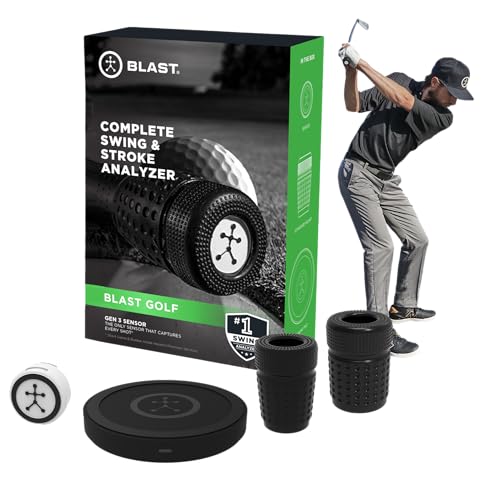
Best for all-around practice with emphasis on real-time feedback. The GEN3 sensor captures swing metrics and supports video capture highlights, sending data to the Blast app for tracking progress. This device is ideal for players who want continuous feedback from tee to green and a focus on short game to lower scores. A one-month Blast Membership is included for new users. Training is possible with or without a ball using Air Swings for off-site practice. Caution: some metrics rely on app connectivity and may require regular updates.
Voice Caddie SC300i Portable Launch Monitor
< figure>

Best for players who want detailed shot data with robust Doppler radar. Measures swing speed, ball speed, carry, total distance, launch angle, and more. The device emphasizes reliable data collection for home or outdoor use, with accuracy claims typical of Doppler-based monitors. Choose this if you value a well-rounded data package and strong measurement reliability in varied lighting and weather. Limitation: data depth depends on the My Swing Caddie app setup and mode selection.
Swinora Golf Launch Monitor & Simulator

Best for enthusiasts seeking a no-subscription experience with strong indoor/outdoor versatility. Swinora offers 13 metrics, 3D driving range visualization, and a 3D trajectory view. It includes built-in environmental sensors to adjust data to actual conditions. Notable is its zero annual fees, which makes it appealing for budget-conscious buyers. If space is limited or you want a vivid, realistic flight path in a compact package, this is a solid pick. Indoor use requires sufficient room for radar capture to avoid data gaps.
TheStack Radar | Golf Launch Monitor
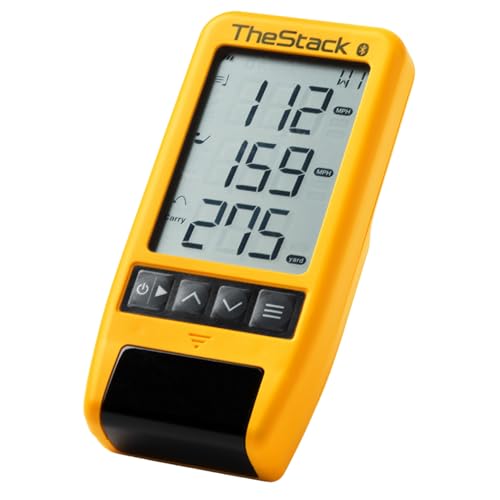
Best for structured practice with a strong software tie-in. The Stack Radar measures swing speed and ball speed, estimates carry, and provides access to a robust wedging app (with a one-month free trial). The system integrates directly with TheStack app via Bluetooth, helping users translate data into targeted training. Choose this if you want guided, app-driven exercise sessions and a focus on short game distance control. Limitation: iOS-only features may limit cross-platform use for some buyers.
Skymons Portable Golf Launch Monitor

Best for compact, on-the-go practice with practical Doppler radar data. Skymons emphasizes a portable design with up to 10 hours of battery life and a focus on home and outdoor use. It provides Doppler radar data for ball and club head dynamics and features tailored performance tests like distance and swing speed. Choose this if you need a lightweight monitor that travels well and suits outdoor training sessions. Note: entry-level limitations may apply if you require advanced club data beyond core metrics.
Buying Guide: What To Look For In A Golf Swing Analyzer
- Data depth: Do you need only swing speed or full ball flight metrics such as carry, launch angle, spin, and apex? Match the device to your goals.
- Measurement technology: Doppler radar tends to offer reliable data for ball flight; optical and sensor-based models may be simpler but less precise for some metrics.
- Space requirements: Indoor use often requires a clear flight area. Check minimum distance between device and ball for accurate capture.
- App integration: Consider how well the device’s app presents data, supports drills, and integrates with other training software you use.
- Costs and subscriptions: Some devices include limited-time memberships or free data access; others require ongoing fees for full features.
- Portability: If you train at the range, on the couch, or in a gym, a compact, battery-efficient monitor can be advantageous.
- Best for whom: Beginners may prioritize tempo and feedback; advanced players may seek speed, carry estimates, and swing plane data.
- Cautions: Some devices require accurate club selection or ball size settings; incorrect setup can skew results.
Frequently Asked Questions
- What is a golf swing analyzer and how does it help my game?
A swing analyzer collects metrics about your swing and ball flight to help you identify patterns, adjust technique, and train with data-driven goals. - Do I need a subscription to use these devices?
Some models include free core features; others offer optional or required subscriptions for advanced drills and data storage. - Can these devices be used indoors?
Yes, most models support indoor use, but you need adequate space to capture ball flight and prevent data gaps. - Which analyzer is best for beginners?
Devices with clear real-time feedback and guided drills tend to help beginners build consistent tempo and fundamentals. - Which one is best for advanced players focusing on distance control?
Look for models offering carry distance, spin, launch angle, and wedge-specific data integrated with targeted practice apps. - Are there any safety or setup considerations?
Ensure your practice area is clear and follow manufacturer setup instructions to minimize data inaccuracies and protect equipment.