In this guide
When searching for computer-based golf swing analysis, these products offer real-time feedback, 3D visualization, and data-driven coaching. This guide helps identify who each option suits best, from serious enthusiasts to casual players. The top five selections balance portability, sensor accuracy, and user-friendly apps for indoor and outdoor practice. The brief buying table below highlights key attributes to compare at a glance.
| Product | Best For | ||
|---|---|---|---|
| PHIGOLF | Tech-savvy players who travel | 3D swing analysis with motion sensors | Works with E6 Connect app; portable and compact |
| Blast Motion | All-weather training and short game focus | Real-time feedback; video capture highlights | One-month Blast membership included |
| TAGCMC Portable Launch Monitor | Home or outdoor practice with space flexibility | 3D driving range and trajectory visuals | Smartphone-based metrics |
| Skymons | Long practice sessions with radar data | PRO X1 Lite with Doppler radar | Includes PRO X1 Plus upgrade option |
| Swinora | Zero-subscription setup for comprehensive data | 3D driving range and smart alerts | Indoor/outdoor ready; clear space requirements |
Buyer profiles considered include: serious golfers pursuing data-driven improvements, casual players seeking fun and convenience, and travelers needing compact systems. The following sections explain each product’s strengths and possible drawbacks, with practical guidance for choosing the right fit.
PHIGOLF Golf Simulator With Swing Stick

PHIGOLF offers a compact indoor/outdoor-compatible system with upgraded motion sensors and 3D swing analysis. The setup stresses Bluetooth pairing and app integration, including access to 38,000+ courses via the Phigolf ecosystem. Best for travelers and home users who want a broad course library without a ball or net. Choose this if you value international course variety and a portable footprint. A potential limitation is dependence on the Phigolf app and compatible devices, which may require periodic updates.
Blast Motion Golf Swing & Stroke Analyzer (GEN3)
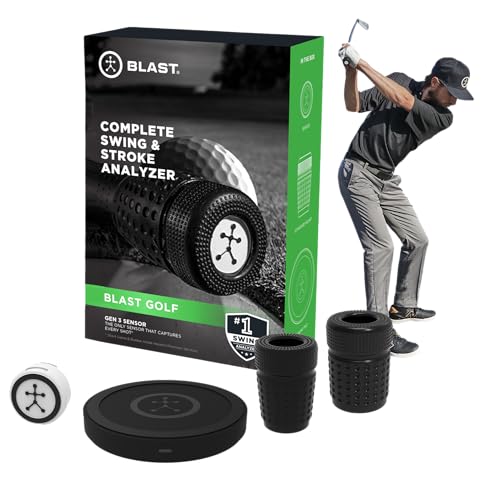
Blast Motion provides real-time feedback across full swings and short game, with video capture highlights that can be reviewed in the companion app. It is suitable for players who want quick, actionable data during practice from tee to green. This option is well-suited for players who value immediate feedback and a structured training plan through the app. A caution: the included membership must be activated to access extended features, and data reliance on a smartphone is high.
Portable Launch Monitor & Simulator (TAGCMC)

TAGCMC emphasizes environmental sensing and 3D data for a flexible space. It uses built-in sensors for real-time data adjustments to match conditions and offers a 3D driving range with multiple viewing angles. Best for home or outdoor practice where space is variable and weather conditions impact practice. Limitations may include setup complexity for new users and the need to sync with a compatible app on a smartphone.
Skymons Portable Golf Launch Monitor

Skymons combines radar-based tracking with extended battery life for long practice sessions. It suits players who want deep data over longer workouts without frequent recharges. Best for independent practice and field use where portability matters. A potential downside is reliance on the radar’s data cadence, which may require careful placement and space management for accurate readings.
Swinora Golf Launch Monitor & Simulator

Swinora offers a zero-subscription, all-in-one approach with 3D driving range and smart alerts. It provides expanded metrics and a clear 15-foot space recommendation for indoor use. Best for players who want a turnkey experience with minimal ongoing costs. Avoid this if your available space is smaller than the recommended distance, or if you require a very large data suite beyond the included metrics.
Buying Guide
What should you look for when choosing a computer golf swing analysis tool?
- Data depth vs. ease of use: Do you want a broad course library and many metrics, or a simple, quick feedback loop?
- Space and setup: How much room do you have? Some devices require at least 15 feet of distance behind the ball; others are compact for travel.
- Sensor technology: Radar-based systems provide dynamic data; camera-based solutions emphasize swing visualization and timing.
- App integration: Check whether the app supports your device, offers video syncing, and provides actionable coaching drills.
- Power and portability: Battery life and the ability to train without a ball can impact where and when you practice.
- Additional features: Look for real-time feedback, trajectory visualization, spin data, and clubface impact visuals to tailor practice plans.
FAQ
- What is the main benefit of a computer golf swing analysis tool?
It provides data-driven feedback on swing mechanics, ball flight, and consistency to guide practice and improve scoring over time.
- Do these devices require a ball to function?
Many models offer modes that don’t require a ball, such as air swings or simulated data, while others track actual ball flight.
- Which device is best for travel?
PHIGOLF emphasizes portability and travel-friendliness, with a compact design and no net required.
- Is subscription required for full features?
Some products offer zero-subscription options (like Swinora), while others include access to premium features via app membership.
- What space should I allocate for accurate data?
Indoor layouts typically require at least 10–15 feet of ball flight space behind the ball, with additional room for swing arc depending on the device.
- Can I use these tools outdoors?
Yes, several models support indoor/outdoor training with environmental sensors that adjust data to real-world conditions.