Looking for a reliable golf driving range screen to practice at home? This guide focuses on easy-to-assemble cages and screens that help contain balls, reduce bounce, and support simulator setups. It’s ideal for serious beginners, dedicated enthusiasts, and anyone seeking a safe, weatherproof practice space. Each option below is selected for stability, enclosure quality, and compatibility with indoor or outdoor setups.
Summary of chosen products:
| Product | Best For | Key Advantage |
|---|---|---|
| ZEALFEEL Golf Simulator Cage | Indoor simulators and backyards | Dual-layer HD screen; robust frame |
| Fnova 11x8ft Golf Simulator Net | Garage or basement practice | Full surround with noise reduction |
| Bltend Golf Net | Spacious, multi-scenario use | Two-in-one projection and practice cloth |
| GYMMALL Golf Practice Net | Versatile training modes | 3-in-1 with HD projector screen |
| GoSports Range Cage 10×8 | Open cage practice | Enclosed cage with impact screen |
ZEALFEEL Golf Simulator Cage With Side Barriers

Best for indoor simulators and high-speed practice, the ZEALFEEL cage combines a 10×8 ft footprint with a dual-layer HD impact screen. The 16mm fiberglass poles and reinforced 6-ply netting absorb powerfully struck shots, while the steel base and sandbags provide stability. This option is ideal for golfers who want a dedicated home bay with projector-based gameplay. It’s best for controlled indoor spaces and setups that require a clear projection backdrop.
Who it’s best for: players with an indoor golf simulator, or those converting a garage or basement into a simulated range. Why selected: the dual-layer screen and sturdy frame balance realism with bounce control. Caution: ensure adequate ceiling height and room ventilation for projection use.
Fnova 11x8ft Golf Simulator Hitting Net
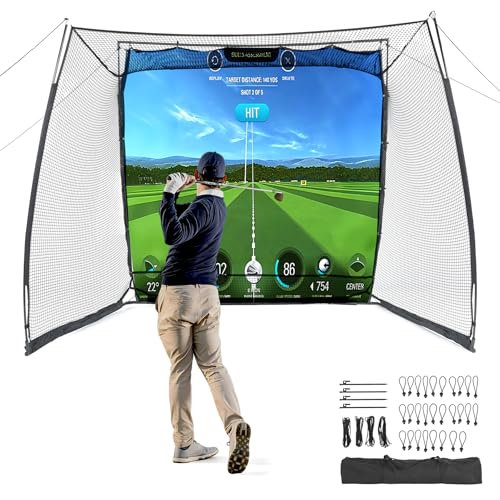
Best for spacious full-swing practice with the option to add a projector screen, the Fnova net features an 11×8 ft hitting area and a noise-reducing, full-surround enclosure. It’s suitable for garages, basements, and dedicated practice rooms. The setup supports a projection screen for simulation experiences, enhancing visual feedback. Choose this if you need a larger space with a quiet practice environment.
Who it’s best for: dedicated home golfers who want a larger practice zone and simulator compatibility. Why selected: combination of full enclosure and HD impact screen makes it versatile for both driving and short game practice. Caution: ensure hardware fits your ceiling height and dedicated projection area.
Bltend Golf Net With HD Impact Screen

Best for multi-scenario practice in garages and backyards, the Bltend net uses a dual-layer HD screen designed for projection compatibility and a noise-reducing target cloth. It accommodates full swings with a large 11×8 ft footprint while offering a spoiler-free projection surface. This is a strong all-around pick for varied practice modes and environments.
Who it’s best for: players who want a projection-friendly net that doubles as a high-capacity practice cage. Why selected: two-in-one design broadens usage from projection-based sims to simple hitting practice. Caution: screen dimensions require adequate space for setup and projection alignment.
GoSports Range Cage 10×8 ft – Classic Net

Best for straightforward, open-hitting bay practice, this GoSports cage provides an enclosed cage with side and top netting to contain shots and reduce ball chasing. It’s ideal for players who prefer a larger, open-air feel without a dedicated simulator screen. The foam-padded base adds safety by limiting rebounds. Choose this if you want a simple, reliable cage for daily practice.
Who it’s best for: casual to intermediate players who value space and containment over projection-based feedback. Why selected: open hitting bay design offers an expansive feel while maintaining ball control. Caution: without a screen, you won’t get visual feedback from a projection system.
Buying Guide
What should you consider when choosing a golf driving range screen?
- Space and layout: Measure your room or outdoor area. Do you want an enclosed cage or an open-hitting bay?
- Screen and impact surface: Look for HD projection screens or impact nets that absorb ball impact and reduce bounce.
- Sturdiness: Check frame materials (fiberglass poles, steel bases) and base padding to minimize movement and noise.
- Projection compatibility: If you plan to use a simulator, confirm the screen supports HD projection and works with your projector or launch monitor.
- Targeting and training aids: Some nets include central targets or pockets to improve aim and accuracy.
- Indoor vs outdoor use: Consider weather resistance, airflow, and weatherproofing for outdoor setups.
- Mobility and storage: Portability matters for seasonal changes or space-limited homes.
Practical setup tips
- Place the cage away from walls to minimize rebound and allow a full swing.
- Use a dedicated projector area with cable management for simulator use.
- Regularly inspect nets and poles for wear, and replace if fraying appears.
FAQ
- Do these nets work without a projector? Yes, many nets function as standard hitting nets without projection, but you’ll miss simulator feedback.
- What size should I choose? A 10×8 ft or 11×8 ft setup fits most garages; larger spaces allow longer backswings.
- Are these cages safe for outdoor use? Most are designed for either indoor or outdoor use; check weather resistance and anchoring requirements.
- Will the screen reduce ball bounce? Yes, HD impact screens are designed to absorb impact and reduce bounce and noise.
- Can I connect a launch monitor? Some options are simulator-ready and compatible with launch monitors and projectors; verify compatibility with your equipment.
- Which is best for beginners? A spacious, containment-focused cage with an impact screen provides forgiving feedback for new players.