In this guide
Answering the most common buyer questions: these indoor golf game simulators and training aids help you practice precise swings, chipping, and putting without a full-size course. They suit busy homeowners, frequent travelers who want portable options, and parents seeking family-friendly golf activities. The top picks here emphasize space efficiency, realistic feedback, and ease of setup. Below, you’ll find five carefully chosen products with practical pros, ideal user groups, and clear limitations to help you choose with confidence.
| Product | Best For |
|---|---|
| PHIGOLF Golf Simulator with Swing Stick | Tech-savvy players who want 3D swing analysis and course variety |
| Complete Golf Simulator Enclosure Package – 4K-Ready | Anyone wanting a contained, professional-looking practice space |
| GoSports 10 x 6 ft Golf Simulator Turf | Home setups needing a modular, premium turf under enclosure |
| MFNMFN Golf Net With Practice Mat | Backyard or indoor practice with a combined net and mat |
| Putt-A-Bout Grassroots Par Three Putting Green | Dedicated putting practice for precise short-game work |
PHIGOLF Golf Simulator With Swing Stick

Best for tech-forward players who want 3D swing analysis and broad course access. The PHIGOLF system offers a motion-sensor-based swing analysis and compatibility with E6 Connect for course variety. It’s portable enough to travel with, and the app-based setup supports indoor use with minimal space, eliminating the need for nets or real balls. This makes it a strong choice for apartment dwellers or frequent travelers seeking realistic feedback without a dedicated room. A potential limitation is calibration complexity for first-time users, which may require watching setup tutorials in the Phigolf app.
Complete Golf Simulator Enclosure Package

Best for buyers wanting a contained practice area with a clean visual setup. This enclosure provides a durable, safe space for serious practice and beginners alike, with a projector mount included to produce immersive visuals. It’s an all-in-one solution that reduces construction time and complexity. The main caveat is that turf and projector are not included, so you’ll need to source those separately, which can affect timing and budgeting for a full setup.
GoSports 10 x 6 ft Golf Simulator Turf

Best for modular home setups that want a premium turf under an enclosure. The GoSports turf is designed to sit beneath an enclosure or hitting net, offering a professional look and better ball rebound control. It supports scalable widths (10, 12, or 15 ft) to match your space. A limitation is that you’ll need to ensure the overall setup includes a compatible enclosure or net to complete the simulator experience.
MFNMFN Golf Net With Practice Mat
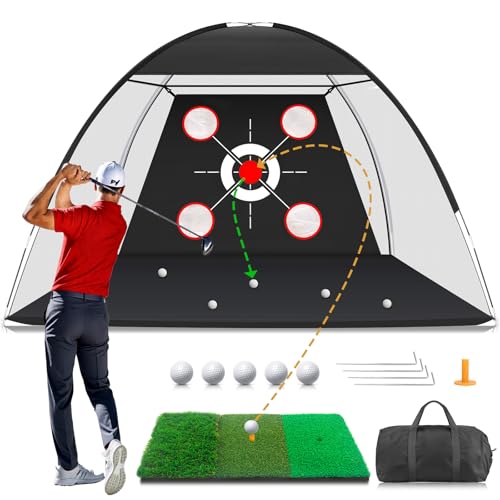
Best for backyard and indoor practice combining a net and mat in one package. This model emphasizes a long practice area with a 10×7 ft footprint, including a turf-like mat to mimic fairway conditions. It’s ideal for drivers and irons, with a ready-to-use setup. A limitation is that it may lack built-in visual feedback or course simulation, so it is best paired with a separate screen or portable projector for more immersive practice.
Putt-A-Bout Grassroots Par Three Putting Green

Best for focused putting practice and short-game refinement. This US-made putting green offers a kidney-shaped layout to improve alignment and rhythm on greens resembling real-world conditions. It’s compact and affordable for dedicated putt practice. A limitation is that it’s strictly a putting surface and won’t emulate full-swing or ball-tracking features found in larger simulators.
Buying Guide
What should you consider when buying an indoor golf game simulator or training setup?
- Space and footprint: Measure the room, enclosure, and turf dimensions to ensure a safe swing zone and adequate ball rebound area.
- Feedback and analytics: Look for motion sensors, swing analysis, or integration with simulation apps to get actionable data.
- Visuals and course variety: Decide if you need large-screen visuals, a projector, or screen-based simulations with thousands of courses.
- Portability vs. permanence: Portable nets and mats are great for travel; full enclosures are better for a dedicated room.
- Durability and setup: Consider the materials, warranty length, and whether you’ll handle installation yourself or hire help.
- Accessories and compatibility: Check if the system requires additional components like projectors, turf, or a projector mount.
Frequently Asked Questions
- What is the best indoor golf setup for small spaces?
A compact enclosure with a high-quality turf and a projector option can maximize space while delivering visuals. Choose models labeled as portable if you move often. - Do indoor simulators require real golf balls?
Many setups use practice balls or nets that can tolerate softer impacts, reducing risk to surroundings. Always confirm the product’s ball requirements. - Can I use any golf simulator with a smart device?
Some models offer compatibility with mobile apps and cloud-based services, while others rely on standalone sensors. Verify app support before purchase. - Is a dedicated room necessary for a great sim experience?
Not strictly, but a dedicated space improves safety, ball rebound control, and overall realism by minimizing distractions. - What maintenance does an indoor golf setup need?
Regularly inspect nets and mats, clean sensors or cameras if present, and replace worn turf sections when needed to maintain consistent ball behavior. - Which product offers the best value for multi-purpose use?
A complete enclosure with built-in projectors or robust software integration tends to offer the strongest long-term value for both practice and entertainment.