In this guide
Golf launch monitors help players capture swing data, confirm practice gains, and refine consistency. The latest models blend advanced radar technology, robust app ecosystems, and portable designs suitable for home bays, garages, or outdoor ranges. This guide highlights five of the newest and most capable options, including Garmin, Voice Caddie, Rapsodo, and The Stack Radar. Each model brings distinct strengths—from in-depth metrics and real-time coaching to immersive training environments. Read on to compare data accuracy, battery life, portability, and how each monitor fits different practice goals.
| Product | Brand | Key Strength | Best For |
|---|---|---|---|
| Garmin Approach R10 Portable Launch Monitor | Garmin | Comprehensive metrics and Garmin Golf app integration | All-around training at home or range |
| Voice Caddie SC200Plus Portable Launch Monitor | Voice Caddie | Real-time voice feedback and swing-speed mode | Live coaching and quick tempo work |
| Voice Caddie SC4 PRO Golf Launch Monitor | VC Voice Caddie | 3D Driving Range and E6 Connect integration | Immersive practice with virtual courses |
| Rapsodo Mobile Launch Monitor | Rapsodo | GPS tracking, video playback, swing analysis | Home simulators and outdoor practice |
| TheStack Radar | The Stack System | App-based training and wedge-focused data | Structured wedge and speed training |
Garmin Approach R10 Portable Launch Monitor
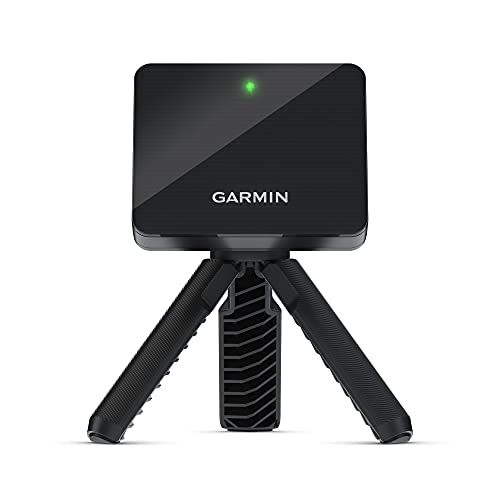
The Garmin Approach R10 offers a compact, portable system designed for indoor practice and driving-range sessions. It provides a broad set of metrics that sync with the Garmin Golf app, enabling shot tracking, dispersion charts, and performance insights across multiple clubs. Notable specifications include precision for club head speed (±3 mph), ball speed (±1 mph), launch angle (±1 degree), and launch direction (±1 degree). The device supports up to 10 hours of battery life, making it practical for lengthy practice blocks away from power outlets. It is weather-resistant with IPX7 classification for casual use in varied conditions.
Users can train by club, review data per session, and visualize dispersion charts to identify strengths and weaknesses. The R10’s strength lies in its balanced data footprint and seamless Garmin Golf app integration, which supports routine practice routines and in-depth analysis. With indoor-to-outdoor versatility, it serves golfers who want actionable feedback without a high price tag. The monitor can be paired with a compatible smartphone to capture core measurements such as speed, spin, and trajectory, helping players gauge improvements over time.
Voice Caddie SC200Plus Portable Launch Monitor

The Voice Caddie SC200Plus emphasizes immediate feedback with Doppler radar technology and a built-in LCD display. It supports real-time data on swing speed, ball speed, and launch metrics, and includes a dedicated voice output to convey results without looking away from the swing. A standout feature is the all-new swing speed mode, which allows you to practice tempo and speed indoors with or without a ball, making it accessible for quick sessions in tight spaces. The SC200Plus touts a substantial battery life, advertised at about 12 hours, and is tailored for both home use and outdoor range sessions.
With Doppler-based measurements and atmospheric calibration, users receive consistent data across practice sessions. The accompanying app ecosystem provides an interface for reviewing shot data, trends, and practice history. The SC200Plus is well-suited for players who want clear, audible coaching cues paired with robust data, plus the flexibility to practice without a ball during swing-speed drills. This model balances portability, clear feedback, and a friendly price point for those starting to explore data-driven practice.
Voice Caddie SC4 PRO Golf Launch Monitor

The SC4 PRO elevates indoor and outdoor practice with pro-grade accuracy via Prometrics Engine, tracking ball and club data from takeaway through impact to flight. It includes access to the 3D Driving Range and E6 Connect, expanding training options beyond simple metrics to immersive virtual practice experiences. A built-in screen and compatibility with the Voice Caddie S App deliver advanced statistical analysis, distance calibration, swing speed radar, and more. This monitor is ideal for golfers who want a self-contained training system with rich virtual practice environments and robust data feedback.
Users benefit from integrated software that supports detailed swing profiling and ongoing improvement. While the SC4 PRO is feature-rich, its user interface may be more involved than entry-level devices, making it best suited for players who want a deeper dive into performance analytics and a connected training ecosystem. The combination of pro-grade data, range simulations, and app-driven insights makes it a compelling choice for serious practice sessions.
Rapsodo Mobile Launch Monitor

The Rapsodo Mobile Launch Monitor brings tour-level data with GPS tracking, enabling precise shot distance, ball speed, club speed, and launch angle. It supports home and outdoor simulators, transforming any space into a golf environment with real-time swing analysis and interactive games. A standout feature is video playback and motion-based shot tracing, which helps golfers visualize ball flight and refine mechanics. It is designed for iPhone and iPad use, providing a sleek ecosystem for reviewing swings and tracking progress over time.
Practically, users gain a flexible practice setup that’s easy to transport between indoor bays and outdoor areas. The Rapsodo system emphasizes visual feedback and performance data, helping players correlate swing changes with shot outcomes. While GPS integration adds value for longer-range practice and course simulation, some users may prefer more hardware-soft integration for Android devices. Overall, it offers a balanced blend of data, video analysis, and accessible training scenarios.
TheStack Radar Golf Launch Monitor

TheStack Radar focuses on speed training with an app-based workflow. It measures swing speed and ball speed, then estimates carry distance and smash factor to guide drills. The radar easily pairs with TheStack App (iOS), delivering a seamless data transfer for practice sessions. A notable feature is the included one-month free trial to Stack Wedge Mode, enabling structured wedge practice with progress tracking and gamified sessions. This monitor is designed for users who want a dedicated speed and distance training tool that integrates tightly with a focused app ecosystem.
Because it emphasizes speed-centric training, TheStack Radar is particularly appealing to players working on distance control and shot shaping with specific clubs. It may be less comprehensive on broader data like spin rate or launch angle compared with all-in-one devices, but its strength lies in targeted drills and consistent app-based feedback. For athletes who want a straightforward, trainer-style setup, this option can be highly effective.
Buying Guide
Choosing the right golf launch monitor depends on how you practice, where you practice, and what data you want to act on. Consider these factors to compare models across the five monitors above and any future purchases:
- Data metrics and accuracy — Look for measurements that matter to your game: club head speed, ball speed, launch angle, spin, attack angle, and distance. Some devices emphasize speed and distance, while others offer broader data sets or integrated video analysis. Note stated accuracy: typical figures can help set expectations for improvement rather than exact values.
- Indoor vs outdoor use — If you practice mainly indoors, prioritize compact form factors, built-in screens or voice feedback, and robust indoor golf simulations. Outdoor use benefits from GPS, longer battery life, and weather resistance but may require more space to capture accurate measurements.
- Power and battery life — Battery longevity affects practice blocks without charging. Devices with 8–12 hours or more are ideal for lengthy sessions. Recharge time and USB-C or standard ports are practical considerations for travel.
- App ecosystem and data visualization — A strong companion app can simplify data review, trend analysis, and drills. Look for features like dispersion charts, shot tracing, video replay, and virtual training modules that align with your practice style.
- Training features and versatility — Some monitors include 3D driving ranges, E6 Connect simulations, wedge shooting modes, or app-based drills. Decide whether you want immersive simulations or straightforward metrics for speed-focused training.
- Portability and setup — Lightweight, compact devices with simple calibration are easier to move between bays or ranges. Consider whether you prefer a dedicated stand or a compact sensor that sits on a mat.
- Compatibility and ecosystem — Check device compatibility with your smartphone or tablet (iOS vs Android). Some models limit use to iPhone/iPad or require specific apps for full functionality.
- Price and value — While prices vary, evaluate overall value through data depth, training tools, and future-proof features like software updates and cloud analytics.
In summary, the Garmin Approach R10 stands out for its well-rounded metrics and Garmin Golf integration, making it a versatile choice for home practice and range sessions. The Voice Caddie SC200Plus and SC4 PRO offer strong indoor capabilities with immersive training options and vocal feedback, appealing to players who value real-time coaching. Rapsodo delivers a strong visual and GPS-driven experience with video analysis, ideal for home simulators that also double as outdoor practice. TheStack Radar provides focused speed training with app-based drills for wedge work. Your best pick depends on whether you prioritize broad data, immersive simulations, or targeted speed work.