In this guide
- Garmin Approach R10 Notable Alternative
- Durbles Premium Triple-Layer Screen
- Durbles Premium Triple Layer Screen (Variant)
- Bushnell Launch Pro i Circle B Edition
- Garmin Approach R50 Premium Overview
- Buying Guide
- Product Comparisons and Selection Rationale
- Garmin Approach R50 Premium
- FlightScope Mevo Gen2
- SkyTrak ST MAX
- Rapsodo Mobile Launch Monitor
- Bushnell Launch Pro i Circle B Edition
- FAQ
Answering the question “which overhead golf launch monitor should I choose?” this guide highlights five top options designed for both indoor and outdoor use. These monitors help you track ball speed, launch angle, spin, and more, making them suitable for dedicated practice spaces, home simulators, or driving range setups. Ideal buyers include tech-forward enthusiasts seeking detailed data, indoor players needing accurate inside-the-house metrics, and those upgrading from basic radar devices. The following sections describe each product, who it’s best for, and practical trade-offs.
Summary of selected products
| Product | Best For | Key Benefit | Limitations |
|---|---|---|---|
| Garmin Approach R50 Premium | Indoor practice with built-in display | 10″ touchscreen with 15+ metrics and built-in cameras | Subscription may be required for full data |
| FlightScope Mevo Gen2 | Portability and versatility | 18 data parameters and 8 E6 courses | Battery life and data depth depend on plan |
| SkyTrak ST MAX | High-accuracy practice with GolfTEC integration | Dual Doppler radar and photometric cameras | Higher upfront complexity |
| Durbles Golf Simulator Impact Screen | Indoor practice spaces with screen durability | Triple-layer impact screen for quiet training | Not a launch monitor by itself |
| Rapsodo Mobile Launch Monitor | Budget-friendly swing analysis | GPS-based tracking and video playback | Outdoor-focused with lighter data set |
Garmin Approach R10 Notable Alternative
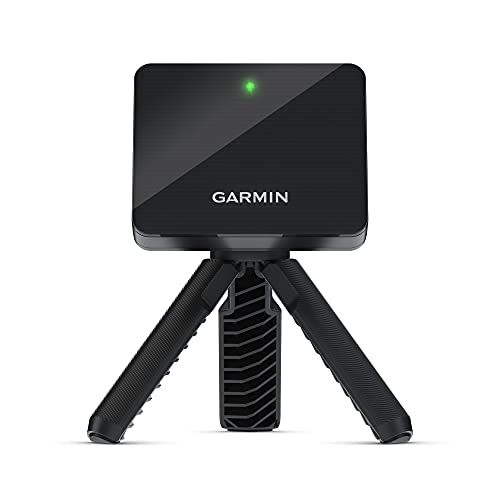
Durbles Premium Triple-Layer Screen

Durbles Premium Triple Layer Screen (Variant)
Bushnell Launch Pro i Circle B Edition
Garmin Approach R50 Premium Overview

Buying Guide
What should you consider when choosing an overhead golf launch monitor?
- Data depth: Identify which metrics matter most to you (ball speed, launch angle, spin, club head speed).
- Indoor vs. outdoor use: Some devices excel indoors with built-in displays; others rely on external software.
- Portability: If you travel or practice in multiple spaces, weight and size matter.
- Display and interface: A clear touchscreen or easy app integration speeds up feedback cycles.
- Software ecosystem: Check available simulators, courses, and subscription requirements.
- Durability and setup: For screens and nets, consider frame quality and ease of mounting.
Product Comparisons and Selection Rationale
Garmin Approach R50 Premium
Best for players who want a built-in display with extensive metrics. The 10″ color touchscreen and multiple cameras enable easy on-site reviews and quick data capture without optional devices. This monitor is well-suited for dedicated practice rooms where a self-contained unit simplifies setup. A potential limitation is that accessing full data often relies on a software subscription, which can add ongoing costs.
FlightScope Mevo Gen2
Best for portability and versatile use across indoor and outdoor spaces. With 18 data parameters and an 8-course E6 bundle, this unit supports in-depth practice while traveling between ranges or backyards. Choose this if you need a compact solution that still delivers robust swing insights. Limitation: battery life and plan features can affect the depth of metrics available on the road.

SkyTrak ST MAX
Best for serious practice with high-data fidelity. The dual Doppler radar and photometric cameras deliver a comprehensive dataset for ball and club metrics. Its modular design aims for stability across long practice sessions, making it a strong choice for repeatable training in a home setup or dedicated studio. Limitation: setup complexity and ongoing software needs can be a consideration for casual users.

Rapsodo Mobile Launch Monitor
Best for budget-conscious buyers who still want meaningful swing analysis. It provides GPS-based shot tracking, ball speed, and video playback to visualize flight. This is an attractive option for beginners or casual players who want quick feedback without heavy hardware. Caution: its primary strengths are in outdoor use and may offer a lighter feature set indoors without additional devices or subscriptions.

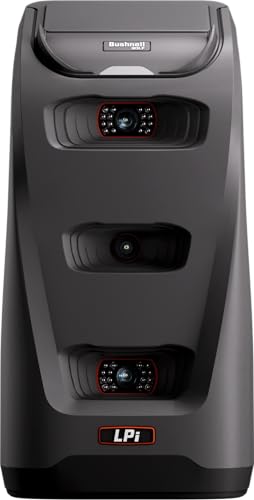
Bushnell Launch Pro i Circle B Edition
Best for indoor practice with tour-level camera-based data. The Circle B LPi uses a three-camera infrared system to measure impact metrics with a focus on precise data indoors. It is a solid choice for players who want accurate results in a compact space. Beware: a software subscription is often required to unlock full ball and club details.
FAQ
- What is an overhead golf launch monitor?
- Do I need a subscription for data?
- Which monitor is best for indoor use?
- Is portability important?
- What data should I prioritize?
- Should I buy a screen with a hitting area?
A device that measures key golf metrics such as ball speed, launch angle, spin, and club data, often used indoors or in a simulator setup to analyze and improve performance.
Many models require a software subscription for full data access and advanced features. Check each product’s data depth and what is included in the base package.
Monitors with built-in displays or strong indoor software support—such as Garmin R50 or Bushnell Circle B—are typically more convenient for indoor setups.
If you travel often or need a multi-space setup, prioritize a portable unit like FlightScope Mevo Gen2 or Rapsodo for flexible use.
Most players prioritize ball speed, launch angle, and spin. For advanced players, club head speed, smash factor, and dispersion data can be decisive for refinement.
Yes, a durable, multi-layer screen helps reduce noise and impact stress, especially in busy homes or clubs. A reliable hitting screen supports longer practice life and cleaner data capture.