Find the best Android-friendly golf swing analyzer to sharpen your game with real-time data, immersive simulations, and portable training. This guide highlights five top options, each suited for different types of players—from casual weekend golfers to serious enthusiasts who want indoor and outdoor versatility. Read on to compare metrics, sensors, and app compatibility to select the right tool for your practice space and goals.
| Product | Best For | Why It Stands Out |
|---|---|---|
| Swinora Golf Launch Monitor & Simulator | All-around indoor/outdoor training | Zero annual fees and environmental sensors with 3D range and trajectory visuals |
| Voice Caddie SC300i | Real-time data on the go | Long battery life and Doppler radar for reliable shot data |
| TheStack Radar | Structured wedge practice | App integration and gamified wedges with data transmission |
| Blast Motion Golf Swing & Stroke Analyzer | Short game focus | Real-time feedback and training modes for versatile practice |
| Rapsodo Mobile Launch Monitor | GPS-tracked shot analysis | Video playback and playback-driven improvement |
Swinora Golf Launch Monitor & Simulator

The Swinora unit is best for players seeking a comprehensive, subscription-free solution with indoor/outdoor flexibility. It tracks 13 metrics and provides a 3D driving range with 3D trajectory visuals. Its environmental sensors automatically adjust data for real-world conditions, helping you practice under varied conditions. Best for: all-around training in homes, garages, or outdoor bays where space is ample. Limitation: indoor setups require roughly 15 feet of space to capture accurate data, so measure your area before setup.
Voice Caddie SC300i Portable Launch Monitor

The SC300i is ideal for golfers who want dependable, real-time shot data with long battery life. It measures swing speed, ball speed, carry/total distance, launch angle, apex, and more, using Doppler radar to provide consistent readings for indoor or outdoor use. Best for: players who value continuous data during practice sessions and on-the-range simulations. Limitation: some users may prefer more expansive analytics in premium apps when deep diving data.
TheStack Radar
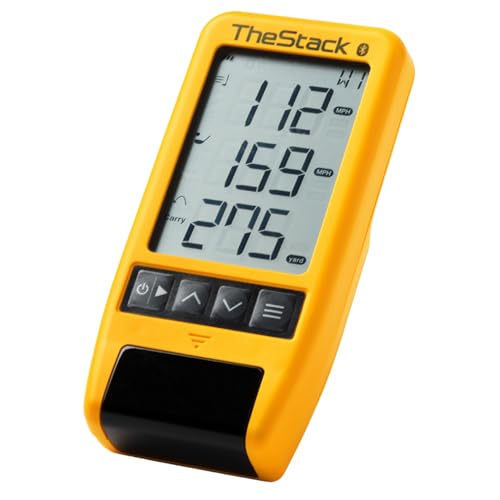
TheStack Radar is best for players who want app-based training and data transmission to a mobile device. It measures swing speed and ball speed, estimating carry and smash factor, and works directly with the Stack App for iOS and Android. Choose this if you value app-integrated training and gamified wedges via Stack Wedging. Limitation: iOS-only features may limit some Android users seeking all-in-one functionality.
Portable Golf Launch Monitor & Simulator (TAGCMC)

TAGCMC’s portable monitor emphasizes advanced environmental sensors that adjust shot data to real-time conditions. It adds expanded metrics like attack angle and a 3D driving range experience, making it a good pick for players who want pro-level insights in compact spaces. Best for: home or outdoor use where portability matters. Limitation: ensure space is sufficient for accurate 3D range visualization in your training area.
SC4 PRO Golf Launch Monitor

The SC4 PRO is best for users seeking pro-grade accuracy with built-in 3D driving range and E6 Connect. It connects to the Voice Caddie App for advanced statistical analysis and distance calibration. Choose this if you want a robust simulator experience with live feedback. Limitation: some advanced features require app integration and may have a learning curve for new users.
Voice Caddie SC200Plus

The SC200Plus is best for players who want a compact, all-in-one swing analyzer with real-time feedback and a long battery life. It uses Doppler radar and atmospheric sensors to provide reliable data, including voice output for instant guidance. Avoid this if you require the most expansive on-device analytics; some users may prefer more extensive dashboard options available in higher-end models.
Buying Guide
- What metrics matter most? Decide which data points you need: swing speed, ball speed, launch angle, carry distance, spin, or 3D trajectory. More metrics help with deeper analysis, but may require more setup.
- Indoor vs outdoor use: Some devices require larger practice space, especially for 3D range visuals. Measure your room or bay to ensure accurate data capture.
- Power and portability: Look for long battery life if you practice away from outlets. Portable units are easier to bring to the driving range or park.
- App ecosystem and data access: Consider whether you prefer a single app with robust analysis, or device-specific apps with limited cross-platform data sharing.
- Data accuracy and limits: Doppler radar and environmental sensors improve accuracy in varying conditions. Check stated accuracy and acceptable error ranges for your use case.
- Budget and subscriptions: Some models are subscription-free, while others require or offer optional memberships. Decide if ongoing costs fit your training plan.
FAQ
- What is a golf swing analyzer used for? – It measures swing and ball data to help you improve technique, distance, and consistency.
- Do I need a subscription for these devices? – Several options are subscription-free, while others offer optional memberships for expanded features.
- Can these work indoors without a full driving range? – Yes, many models provide 3D range simulations and indoor metrics, with recommended space for accuracy.
- Which device is best for beginners? – Look for user-friendly interfaces, automatic data interpretation, and reliable real-time feedback.
- Are Doppler radar-based analyzers more accurate? – Doppler radar improves data reliability, especially for outdoor conditions and wind factors.
- Can I use these with both Android and iOS? – Many models support Android and iOS via dedicated apps, but some features may be platform-specific.