Answering the common buyer search for accurate, portable golf launch monitors, this guide highlights five standout options. Each model is suited to a different type of player—from casual practice at home to serious swing analysis on the range. If you want immediate, battery-powered data with no apps, consider compact models. If you value GPS, video playback, and integrated apps, one of the larger, feature-rich units may suit you better. The table below compares the five picks at a glance to help you choose quickly.
| Product | Best For | Key Benefit | Limitation |
|---|---|---|---|
| PRGR HS 130-A | Budget-conscious players | Doppler radar with ball and club speed | No Wi-Fi or app needs |
| Shot Scope LM1 | Real-time tracking on the go | Compact with instant smash factor and carry | Limited advanced features vs. high-end models |
| Rapsodo MLM2PRO | Home or range with depth of data | 15 metrics and video integration | Requires setup; some users want richer sims |
| TheStack Radar | Structured speed training | Bluetooth app integration and 1-month wedge mode | App-centric workflow |
| Swinora | All-weather, indoor/outdoor practice | Zero annual fees; sensors adjust data |
These five options provide a balanced mix of portability, data depth, and app support. Use the Buyer’s Guide below to refine your choice based on space, data needs, and how you intend to use the device during practice.
PRGR HS 130-A Portable Golf Launch Monitor

PRGR uses advanced doppler radar to track club head speed (with or without a ball), ball speed, smash factor, total and carry distance. It’s widely regarded as one of the most affordable launch monitors capable of delivering precise swing data without requiring Wi-Fi or apps. The device stores up to 500 past swings, enabling trend tracking over time. Best for players who want a straightforward, data-focused tool on a budget.
Who it’s best for: Beginners and casual players who want essential metrics without the overhead of a connected ecosystem. Why selected: Excellent value and dependable data for core swing analysis. Caution: Lacks app-based features and live video, which some users prefer for deeper analysis.
Shot Scope LM1 Portable Mini Launch Monitor

The LM1 provides advanced ball and club speed tracking with real-time smash factor and total carry distance. Its compact design makes it a practical companion for practice on the range or at home. Best for players who want a portable, all-in-one device with rapid data feedback and a simple setup.
Who it’s best for: Golfers who travel or practice in small spaces and want quick, clear results. Why selected: Strong balance of data depth and portability. Caution: May omit some high-end features found in battery-powered, app-heavy monitors.
Rapsodo MLM2PRO Launch Monitor

The MLM2PRO is designed for both home and driving range use, delivering tour-level shot data with a dual-camera setup and Doppler radar. It captures a broad set of metrics and includes a 45-day premium trial to access simulated courses and apps. Best for players who want a comprehensive data suite and the option to expand into simulated play.
Who it’s best for: Dedicated golfers seeking extensive metrics and integration with training apps. Why selected: Broad data coverage and an enticing trial for advanced training. Caution: The setup can be more involved, and some users may find the feature set overwhelming initially.
TheStack Radar
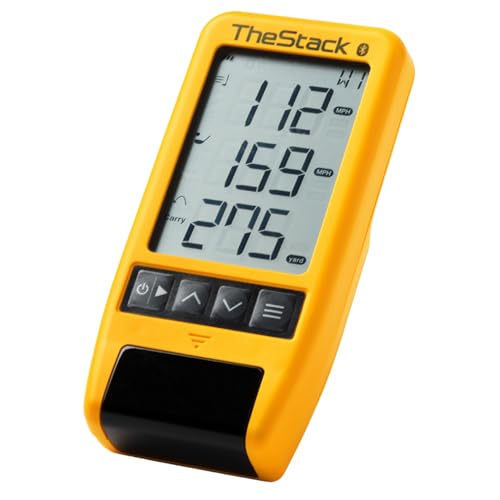
TheStack Radar is designed for structured speed training and wedge practice through its app ecosystem. It measures swing speed and ball speed, estimates carry, and works with the Stack app for a gamified practice routine. Best for users who want guided training sessions and connectivity to a training platform.
Who it’s best for: Tech-savvy players who enjoy app-based training and gamified practice. Why selected: Strong training-focused features and easy data transfer. Caution: App reliance means performance depends on smartphone compatibility and app updates.
Swinora Golf Launch Monitor & Simulator

Swinora offers a zero-fee app with environmental sensors that adjust data for real-world conditions. It provides expanded metrics such as attack angle, launch angle, and spin rate, suitable for indoor/outdoor use. Best for players who want an affordable, sensor-adjusted platform with robust metric sets and no recurring costs.
Who it’s best for: Players seeking a feature-rich experience without ongoing subscription costs. Why selected: Comprehensive data with adaptive environmental sensing. Caution: Indoor space requirements are important to ensure radar can capture accurate data.
Buying Guide: Key Purchase Considerations
- Data depth vs. ease of use: High-end devices offer many metrics and advanced features, but simpler models provide faster, clearer feedback for beginners.
- Portability and power: Battery-powered, compact units are ideal for travel, while larger systems may require a dedicated space or power source.
- App integration: Some monitors rely heavily on companion apps for data, drills, and simulations. Consider whether you want standalone stats or a connected training ecosystem.
- Indoor vs. outdoor use: Sensor sensitivity and radar range affect accuracy in tight spaces or windy conditions. Ensure space aligns with the device’s recommended footprint.
- Data interpretation: Look for models that present data in actionable formats, such as clear swing metrics, carry predictions, and intuitive graphs.
FAQ: Quick Answers For Buyers
- Do I need an internet connection to use these monitors? Some models work offline, while others pair with apps for enhanced features. Check the product description for app requirements.
- What metrics are most important for improvement? Ball speed, club speed, smash factor, carry distance, and launch angle are common essentials. Choose based on your goals.
- Can these devices replace a golf coach? They provide valuable data for self-guided practice but may not fully replace personalized coaching for technique changes.
- Are the monitors compatible with iOS or Android? Most modern models support both, but some features may be restricted to specific apps or platforms.
- Is a subscription required for advanced features? Some devices offer free core data with optional app-based training or premium trials.
- How much space do I need for indoor use? Check each model’s recommended room size; some require about 15 feet of space behind the ball for accurate measurements.