If you’re building a compact, organized golf simulator space, a dedicated computer cabinet or stand is essential. These products help keep your PC, projector, and accessories secure, accessible, and neatly arranged. This guide highlights five practical options suitable for different budgets and room layouts, from adjustable CPU stands to full enclosure packages. Ideal buyers include: compact-room golfers needing under-desk clearance, pro-grade home-builders seeking durable enclosures, and beginners wanting simple, ready-to-use kits.
Tovetailing with a clean setup, the following table compares the top five picks by purpose, best use case, and key strengths. Use it to narrow your choices quickly before diving into product details.
| Product | Best For | Why It Stands Out | Limitations |
|---|---|---|---|
| Bearfire Height Adjustable Computer Tower Stand | Under-desk configurations | Adjustable height, wheels for mobility, sturdy steel construction | Requires checking PC dimensions |
| ANYTHING SPORTS Complete Golf Simulator Enclosure Package | All-in-one practice space | 4K-ready enclosure with projector mount, durable frame | Enclosure not including turf or projector |
| Club Keyboard Sim Caddie Golf Simulator Controller Box | Hitting area control | Native USB keyboard, plug-and-play, convenient controls | Limited to control box functions |
| TIFFLOI 5-Level Adjustable Tower Stand | Flexible home-office and under-desk needs | Five height positions, two-tier design, mobile | Product dimensions must fit space |
| GoSports Golf Simulator Enclosure Net Sets | Enclosure-only or starter kits | Durable impact screens, easy installation | Frames and nets are separate from the turf/monitor |
Bearfire Height Adjustable Computer Tower Stand

The Bearfire stand is a practical, height-adjustable solution for under-desk PC setups. It supports towers up to 27 inches high and offers four height settings, making it compatible with most ATX cases. Its four 360° wheels enable easy positioning, and two lockable casters keep the unit stationary when needed. The frame uses a thicken steel build and supports up to 80–100 pounds depending on placement, with a top surface and bottom shelf designed for stability. This option is best for buyers who want flexible under-desk placement, easy mobility, and a robust build without committing to a full enclosure. Caution: verify your PC dimensions before purchasing to ensure a proper fit.
Who it’s best for: Home office gamers and hobbyists needing mobility and adjustable height without a bulky cabinet. Why selected: Combines mobility, height flexibility, and solid construction in a compact footprint. Caution: check case depth and width to avoid overhang or fit issues.
Complete Golf Simulator Enclosure Package

This enclosure package provides a ready-made, 4K-ready practice space with a blackout cage, projector mount, and frame poles. It’s designed for serious golfers seeking a safe, professional-grade setup at home, while beginners can appreciate the straightforward assembly and visual appeal. Note that turf and projector aren’t included, which keeps initial costs lower while allowing you to pick your preferred turf and projector system. Best for buyers who want a durable, all-in-one practice cage and a clean visual presentation.
Who it’s best for: Home golfers who want a complete, ready-to-use enclosure for indoor practice. Why selected: Durable construction and included projector mount simplify installation. Caution: you’ll need to source turf and the projector separately.
Club Keyboard Sim Caddie Golf Simulator Controller Box
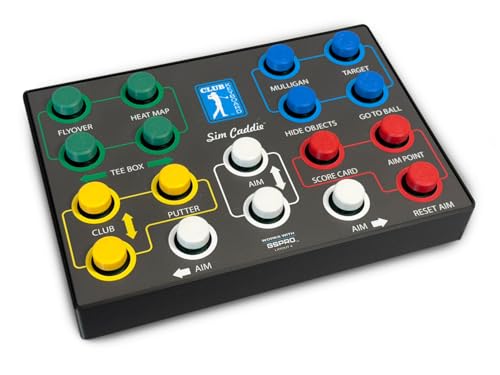
The Club Keyboard Sim Caddie is a native USB keyboard designed for golf simulators. It requires no software and delivers plug-and-play operation with a 15-foot USB cable included. This controller box provides essential on-hitting-area controls, simplifying the user experience. Best for players who want seamless, wired control without software setup. Caution: limited to control functions; not a full enclosure or PC solution.
Tip: For a compact setup, pairing this controller with a simple under-desk stand can reduce clutter around the hitting mat while keeping all controls within reach.
TIFFLOI Five-Level Adjustable Tower Stand

The TIFFLOI stand offers five manual height positions (23.2″ to 33.5″) with a two-tier design for additional components like a printer or files. It’s designed for floor use and helps optimize cooling and accessibility under or beside a desk. The pegboard back provides organization options for power strips and cables. Best for buyers who want a tall, flexible stand that accommodates multiple peripherals while maintaining space efficiency. Caution: check dimensions to ensure the stand fits your under-desk area.
GoSports 12 x 9 ft Golf Simulator Enclosure Net

This GoSports enclosure net set features a commercial-grade, heavy-duty impact screen designed to withstand high-speed golf ball impacts. It includes reliable framing and an HD projection-ready surface. Easy to install with clear hardware and instructions, it’s ideal for dedicated home simulators aiming for professional-looking practice spaces. Best for users who want a robust enclosure that supports consistent practice sessions. Limitation: frame and net kit alone may require separate roll of turf or mat and projector alignment hardware to complete the setup.
GoSports 10 x 8 ft Golf Simulator Enclosure Net

Another GoSports enclosure option, the 10 x 8 ft kit provides a compact yet capable practice space with a heavy-duty impact screen and easy setup. It’s a solid choice for those starting a home golf simulator project or needing a smaller footprint than the 12 x 9 ft version. Best for buyers with smaller rooms who still want a durable, reliable screen and enclosure. Limitation: smaller footprint may limit shot angles and swing room compared to larger enclosures.
Buying Guide
Key purchase considerations help tailor choices to your space, budget, and practice goals.
What’s your space and layout?
Measure available floor space and under-desk clearance. If you have a compact space, a height-adjustable stand with wheels (like the Bearfire or TIFFLOI) can keep the PC accessible without a full enclosure. For larger rooms, an all-in-one enclosure (ANYTHING SPORTS) provides a dedicated practice zone.
Do you need mobility or a fixed setup?
Mobility is ideal for multi-use rooms or frequent rearrangements. Fixed enclosures are better for dedicated practice areas where the setup stays put and you want a cleaner visual footprint.
What peripherals are essential?
Consider whether you need a dedicated control box (Club Keyboard Sim Caddie), a printer or monitor shelf (TIFFLOI two-tier design), or a projector mount (ANYTHING SPORTS). Plan cable management and accessibility around your hitting mat and swing path.
What is your budget and risk tolerance?
Enclosures add to overall cost but deliver a professional environment and safety. Stand-alone towers and carts are typically lower-cost, with flexibility to adapt as needs change.
Durability and safety are priorities?
Look for sturdy materials, weight limits, and certified or lab-tested frames for long-term use. Enclosures with padded corners and reinforced screens reduce rebound and increase safety.
Ease of installation and future upgrades?
Choose products with clear assembly instructions and modular components. If you anticipate future upgrades (new turf, better projectors), pick items that can adapt without a full rebuild.
FAQ
- What should I consider first when building a golf simulator cabinet? Assess space, power needs, and whether you want a full enclosure or a flexible stand for a PC and peripherals.
- Is a projector mount essential for a home setup? Not always, but a projector mount simplifies alignment and keeps the setup tidy. It’s especially helpful in enclosure packages.
- Can I use a regular desk with a golf simulator? Yes, but you may still want a dedicated stand or enclosure to protect your PC and organize cables.
- Are illuminated or cable-managed enclosures better? Cable management reduces tripping hazards and protects equipment; illumination helps with alignment and setup visibility.
- What’s the best option for beginners? A complete enclosure package provides a ready-to-use space with minimal assembly and helps create a consistent practice environment.
- Do these products require professional installation? Most items come with instructions and can be installed by a typical homeowner; larger enclosures may benefit from an extra set of hands.