Finding a golf setup that fits an office or small workspace can be challenging. This guide highlights five top options designed to improve putting, swing analysis, and overall practice without demanding a full driving range. From compact putting mats to full enclosure systems and smart simulators, these picks balance space, budget, and realistic feedback for corporate environments or home offices. Below is a quick overview table of the selected products to help you compare at a glance.
| Product | Brand | Type | Key Benefit |
|---|---|---|---|
| PHIGOLF Golf Simulator with Swing Stick | PHIGOLF | Portable Simulator | 38,000+ courses via app; compact travel-ready setup |
| GoSports 12 x 9 ft Enclosure Net | GoSports | Enclosure Kit | Professional studio feel with HD impact screen |
| GoSports 10 x 8 ft Enclosure Net | GoSports | Enclosure Kit | Balanced space and swing safety in tight rooms |
| Swinora Golf Launch Monitor & Simulator | Swinora | Monitor & Simulator | Indoor/outdoor versatility with 3D trajectory data |
| TAYNING Putting Green Indoor Mat | TAYNING | Putting Mat | Auto ball return and wrinkle-free rolling |
PHIGOLF Golf Simulator With Swing Stick

PHIGOLF blends portable hardware with an expansive library of courses through an app. Setup instructions emphasize ease of use, Bluetooth pairing, and compatibility with supported devices. The system offers 38,000+ courses worldwide via Phigolf, plus a selection of classic and HD courses within the app. The compact design suits small spaces, making it suitable for an office or travel use. The emphasis is on real-time feedback, swing tracking, and a space-saving footprint, helping users practice both indoor and outdoor-style swings without requiring a full room dedicated to golf.
GoSports 12 x 9 ft Golf Simulator Enclosure Net

This professional-grade enclosure creates a dedicated indoor golf studio feel in a room-size footprint. The steel frame and reinforced HD impact screen are designed for real balls and all swing speeds, reducing rebound and providing a reliable practice environment. Foam padding minimizes contact with surrounding areas, improving safety and durability. It’s compatible with a wide range of launch monitors and projectors, though setup space must be measured to ensure the frame fits your specific room configuration.
GoSports 10 x 8 ft Golf Simulator Enclosure Net

This enclosure balances space and realism for smaller rooms. The 4:3 aspect enclosure with top and side walls keeps balls contained and helps protect surrounding areas. The sturdy steel frame and HD impact screen support safe practice with real balls at varied swing speeds. As with larger setups, verify room dimensions and compatible equipment before purchase to ensure a proper fit for your office or apartment space.
Swinora Golf Launch Monitor & Simulator

Designed for both indoor and outdoor use, the Swinora system includes environmental sensors that adjust shot data to real-time conditions—temperature, humidity, and barometric pressure—offering more accurate analytics. Expanded metrics such as attack angle and launch angle provide deeper insights into each swing. The 3D simulation mode presents a realistic driving range with multiple viewing options, enabling varied practice scenarios in compact spaces. It’s suitable for enthusiasts seeking data-rich feedback without a permanent installation.
TAYNING Putting Green Indoor Mat
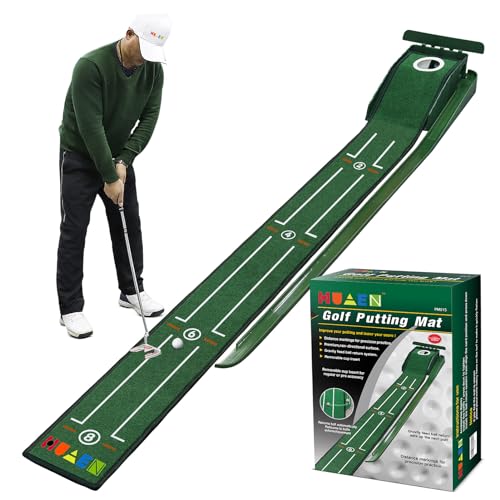
This auto-return putting mat features a simple, wallet-friendly design that’s ideal for a desk or small office. The built-in ball return directs the ball back to the initial position after a putt, allowing continuous practice without bending or chasing. The mat includes alignment markers at 2, 4, 6, and 8 feet to help calibrate distance control and improve consistency. Its velvet surface minimizes noise and wrinkles, ensuring a smooth roll and stable practice surface in a busy office setting.
Buying Guide: Key Considerations For Office Golf Setups
- Space and footprint: Enclosures require floor area; measure ceilings and corners to ensure proper clearance and swing room.
- Purpose and skill level: Choose a system that matches your goals—short-game practice, full-swing simulation, or data-driven improvement.
- Data and feedback: If you want analytics, prioritize simulators with sensors, launch metrics, and compatible apps.
- Portability and installation: For an office, consider systems that are easy to assemble, disassemble, or move between locations.
- Durability and safety: Look for sturdy frames, impact screens, and non-slip bases to protect office equipment and floors.
- Maintenance: Check for wrinkling, ball return reliability, and ease of cleaning, especially in shared spaces.
- Compatibility: Verify compatibility with your devices, apps, and any existing launch monitors or screens.
- Budget and scalability: Start with compact options if space or budget is tight; many brands offer upgrade paths as needs grow.