Answering the question that many golfers ask: what are the best golf simulator setups for a dedicated home practice space? This guide highlights five top options that balance durability, ease of installation, and realistic practice. These kits are ideal for dedicated hobbyists, home studios, garages, and small indoor spaces where you want reliable impact protection, clear visuals, and a compact footprint. Each pick is explained with who it’s best for and why it stands out in the market.
Here’s a quick table of the five chosen products to help you compare at a glance:
| Product | Best For | Key Benefit |
|---|---|---|
| GoSports 12 x 9 ft Enclosure | Mid-size home bays | Sturdy frame with HD impact screen |
| GoSports 10 x 8 ft Enclosure | Compact spaces | Efficient footprint, strong protection |
| IDEATRY Golf Studio Enclosure | All-in-one training | 3-in-1 screen, net, target |
| Swinora Launch Monitor Kit | Digital data focus | Advanced metrics with no annual fees |
| GOLF Tee Set by MARGIN | Consistent setup practice | Height-adjustable and stable |
GoSports 12 x 9 ft Golf Simulator Enclosure Kit

The GoSports 12 x 9 ft enclosure is designed for mid-size home bays that require a robust, long-lasting impact surface. This kit includes a heavy-duty impact screen and a reinforced frame that supports reliable performance with most launch monitors. Choose this if you have a dedicated room or garage space and want a true home-golf experience with minimal setup time.
Best for: Players needing a durable, mid-sized enclosure that offers solid protection and straightforward assembly. The design emphasizes a high-quality screen and frame system to support frequent practice sessions.
Why selected: It balances commercial-grade materials with practical installation steps, delivering consistent projection quality and dependable rebound control for repeatable swings.
Limitations: Larger footprint than the 10 x 8 ft option; not ideal for very compact spaces if you need a tighter fit.
GoSports 10 x 8 ft Golf Simulator Enclosure Kit

The 10 x 8 ft enclosure is tailored for smaller rooms while preserving the same reliability as larger kits. It uses a commercial-grade impact screen and a reinforced frame to reduce rebound and provide a clean projection surface. This makes it a strong option for homeowners with limited space who still want a premium golf-simulation environment.
Best for: Individuals with tighter rooms who still want a dependable, easy-to-assemble setup. The kit prioritizes compact design without sacrificing safety or image clarity.
Why selected: It strikes a practical balance between size and durability, ensuring you can set up quickly and start practicing with minimal area required.
Limitation: Slightly smaller practice area may limit certain swing styles or shot shapes compared with larger enclosures.
IDEATRY Golf Simulator Impact Screen Enclosure
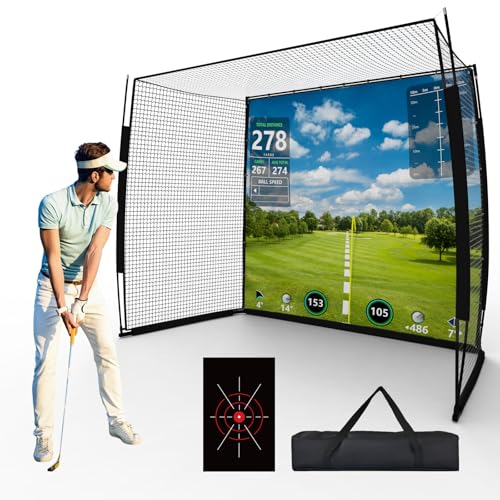
The IDEATRY system pairs a heavy-duty enclosure with a thick, 6-ply high-density net and a 270° protection design. It’s engineered to trap shots across a wide range of angles, making it ideal for all-weather home gyms and garages where space may vary. It’s particularly suitable for users who want an all-in-one training setup that supports year-round practice.
Best for: Players seeking comprehensive protection and expansive coverage for swing variety, including side and top nets. The package is well-suited for group practice and family use indoors or outdoors.
Why selected: The 270° protection and reinforced frame provide stability and safety while maintaining clear visuals and durable construction.
Limitation: Projector compatibility depends on screen size and space; verify fit before purchase if you have a pre-placed projector.
Swinora Launch Monitor & Simulator Kit

The Swinora kit focuses on data-driven practice with a 13-metric launch monitor and 3D simulation. It includes essential measurements like attack angle, spin rate, and ball flight data, designed for indoor/outdoor use. It’s best for players who want rich analytics without ongoing subscription costs and who can establish a suitable 15-foot space for reliable radar tracking.
Best for: Golfers who prioritize advanced data tracking and a subscription-free experience. Suitable for home studios or garages with enough room to accommodate a radar-based monitor.
Why selected: The zero annual fees and extended metric set make this option attractive for data-driven practice and ongoing improvement.
Limitation: Indoor use requires specific space planning (about 15 feet total length) to ensure accurate data capture.
MARGIN Height Adjustable Golf Tees

The Margin Tee system ensures tees stay in place during repeated drives, with three height options for versatile practice setups. It’s a practical accessory for simulators and mats, reducing interruptions and keeping a consistent tee height across sessions. This is especially useful for users who practice repetitive shots or chipping drills on mats.
Best for: Players who want consistent tee height and a clutter-free practice area, especially with home mats or simulator setups.
Why selected: The adjustable heights and durable material minimize tee replacement and optimize practice routines.
Limitation: Ties to mat-based setups; surface conditions or mat quality can influence stability in some rooms.
GoSports 12x 6 ft Golf Simulator Turf

The 12x 6 ft turf sections provide a premium surface to place under enclosures or nets. It’s designed to dampen ball impact and reduce rebound for more realistic practice while offering modularity to adapt to different enclosure sizes. This turf is ideal for users who want a professional-looking setup without a full studio build.
Best for: Home setups that need a finished look and realistic ball interaction on a modular footprint.
Why selected: The turf’s muffling properties and modular design enhance both aesthetics and function in small-to-medium spaces.
Limitation: Requires compatible enclosure or frame to complete the setup; may not be a standalone solution.
Durbles Golf Simulator Enclosure Kit
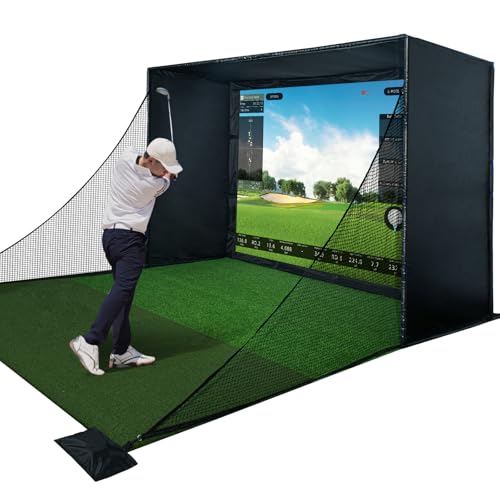
The Durbles kit adds a full enclosure with premium HD impact screen, safety padding, and blackout curtain. This complete package emphasizes safety and visual quality, designed for users who want a turnkey solution that minimizes setup complexity while delivering strong rebound control and reliable performance with a Launch Monitor.
Best for: Home builders who prefer a single, all-in-one enclosure with enhanced safety padding and screen protection.
Why selected: The triple-layer screen and full padding approach reduce noise and mis-hits, supporting intense or frequent practice sessions.
Limitation: It is a larger setup; verify room dimensions before purchasing to ensure it fits your space.
Buying Guide: Key Considerations for Your Golf Simulator Setup
- Measure room length, width, and height to determine the best enclosure size (10×8 ft, 12×9 ft, etc.). Consider door clearance and ceiling height for full swing clearance.
- Look for multi-layer impact screens and reinforced frames that minimize rebound and maximize projection clarity.
- Full-padding options reduce ricochets and protect walls and windows during aggressive swings.
- Ensure the enclosure works with your projector type, radar or camera-based launch monitors, and space for proper data capture.
- Quick-install kits with labeled hardware and clear instructions save time and reduce the risk of incorrect assembly.
- A high-quality turf adds realism and helps dampen ball rebound, improving swing feedback.
- Choose materials designed for frequent use, with weather resistance if used in garages or semi-outdoor spaces.
FAQ
- What size enclosure is best for a small room? A 10 x 8 ft enclosure is typically ideal for compact spaces, offering a balance of protection and footprint.
- Do I need a separate projector with an enclosure? Not always, but many setups pair with projectors for full-screen visuals; verify space and throw distance requirements before buying.
- Is it necessary to use safety padding? Safety padding reduces ricochets and protects walls, especially in active practice spaces.
- Can I reuse existing turf or mats? In many cases, you can, but ensure compatibility with your enclosure and frame for proper alignment and stability.
- Do launch monitors require ongoing subscriptions? Some kits offer zero-subscription sensors and data access, while others may include features that align with subscription-based services.
- What should I verify before purchasing? Check space measurements, projector compatibility, frame stability, screen thickness, and safety padding coverage.