Direct answer: If you want to gain swing speed and distance, these top five products use app-based training, radar or launch monitor data, and structured training protocols to help you increase club head speed. They’re suited for competitive amateurs seeking measurable gains, coaches guiding athletes, and casual players aiming for longer drives. Below, find quick-fit descriptions and a summary table to compare key strengths.
Summary table of selected products
| Product | |||
|---|---|---|---|
| SuperSpeed Golf | Swing Speed Training System | Weighted sticks + app protocols | Athletes and serious amateurs seeking overspeed gains | Proven distance gains, widely used by pros and amateurs, science-backed training progression |
| Rapsodo MLM2PRO Launch Monitor | Launch monitor with app integration | Home practice and simulator use | Tour-level data, video playback, trackable metrics across shots |
| PRGR HS 130-A Portable Launch Monitor | Portable Doppler radar | Budget-friendly practice, basic speed data | Very affordable data source, no app required |
| TheStack Radar | Radar-based swing and ball speed with app | Structured wedge and swing training on the go | App-connected precision with dedicated training modes |
| Swing Speed Radar | Bluetooth-enabled swing speed tool | Simple, quick speed feedback | No-ball rely or ball-free swing speed readings, easy setup |
SuperSpeed Golf – Swing Speed Training System

The SuperSpeed system uses three CNC milled weighted sticks designed for overspeed training. It targets increasing club head speed by training from light to heavy to reduce dynamic resistance. Best for competitive amateurs and pro-level enthusiasts who want measurable club head speed gains and longer drives. This kit is well-suited for structured, protocol-driven practice and is widely used by major champions and touring pros. A potential limitation is that progress relies on consistent use and proper form; beginners should follow the app training protocols to avoid overload.
Who it’s best for: Players seeking proven overspeed drills and a scalable approach to speed gains, including long-drive competitors and tour-level aspirants.
Rapsodo MLM2PRO Launch Monitor Golf System

The MLM2PRO offers tour-level shot data, including ball speed, club speed, launch angle, and more, with GPS for precise tracking. It doubles as a home simulator and swing analyzer, featuring video playback and active shot tracers for visual feedback. This is best for players who want an all-in-one practice system and a robust digital record of performance over time. Limitations can include setup complexity for first-time users and the need for compatible devices to maximize features.
Who it’s best for: Players who want actionable data, video analysis, and a home-simulator experience to guide improvement across sessions.
PRGR HS 130-A Portable Launch Monitor

The PRGR HS 130-A utilizes Doppler radar for accurate tracking of club head speed, ball speed, smash factor, and carry distance. It’s notably affordable and requires no Wi-Fi or apps, relying on battery power for quick data reads. It stores up to 500 past swings, useful for quick comparison. A caution is that the data simplicity may be less comprehensive than higher-end devices for some users seeking deep analytics.
Who it’s best for: Budget-conscious players who want straightforward swing speed data without relying on Bluetooth or a smartphone app.
RYP Golf Radar Swing Speed Monitor (Rypstick)

The RypRadar is a no-ball measurement tool that accurately gauges swing speed by swinging a Rypstick, driver, or iron. It’s designed for faster feedback without hitting a ball, which is useful for repeatable practice and quick progress checks. Best for players who want quick feedback during dry swings or when ball striking is impractical. A potential limitation is that some users may prefer ball-based metrics for broader swing analysis.
Who it’s best for: Players focused on swing-speed feedback in a no-ball setting, useful for concise practice sessions and portable speed checks.
TheStack Radar | Golf Launch Monitor And App
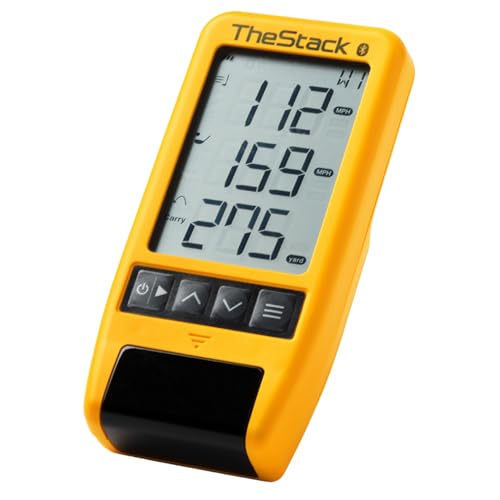
TheStack Radar provides swing and ball speed measurements and estimates carry distance with data transmitted to the Stack App via Bluetooth. It’s designed to work seamlessly with Stack’s training ecosystem, including a dedicated wedge training mode through Stack Wedge. This makes it a strong choice for players already invested in Stack’s training universe. A caveat is that full app-based features may require ongoing subscription or app access.
Who it’s best for: Players pursuing integrated app-based speed and wedge training, especially those who want a structured practice environment with data capture.
Swing Speed Radar – Bluetooth Speed Tool

This Bluetooth-enabled device delivers precise swing speeds from 40 to 220 mph, usable with or without a ball. It’s designed for straightforward, club-by-club progress tracking and voice feedback through paired devices. Best for players who want quick, audible speed updates and simple use without extensive setup. Consider that this device emphasizes speed readings and may require separate data interpretation for full swing analysis.
Who it’s best for: Players seeking quick, club-specific speed feedback with an easy setup and voice-guided results.
Buying Guide: How to Choose The Right Golf Swing Speed Tool
- Your goal: If you want maximum speed gains with proven training protocols, consider overspeed systems like SuperSpeed or equipment that emphasizes measured progress via apps and data dashboards (TheStack Radar, MLM2PRO).
- Data depth: For in-depth analysis including ball flight and carry, choose devices with launch data, video playback, and multi-metric tracking (Rapsodo MLM2PRO, TheStack Radar).
- Budget and setup: Budget-conscious or simple setups favor PRGR HS 130-A or Swing Speed Radar. If you want a full training ecosystem, consider bundled options with app integration.
- Portability: For on-the-go practice, handheld Doppler or no-ball swing tools (PRGR HS 130-A, RYP Radar) offer portability without heavy setup.
- App ecosystem: If you prefer a cohesive training workflow with wedge or course simulations, look for systems that tie into dedicated apps (Stack, MLM2PRO).
- Accuracy vs convenience: Higher-end monitors may offer richer data but require more learning; affordable options provide quick feedback but less nuance.
Frequently Asked Questions
- What is the primary benefit of a swing speed training system like SuperSpeed? It uses overspeed training to help increase club head speed through a progression of lighter-to-heavier sticks, aiming to boost speed and distance over time.
- Do launch monitors like MLM2PRO require a lot of setup? They can require initial setup and calibration, but provide extensive data across shots with video and analytics once configured.
- Is a no-ball radar useful for beginners? Yes, no-ball tools offer quick feedback on swing speed and mechanics without ball impact, which can reduce mis-hit data influence early on.
- Should I buy multiple tools or just one comprehensive system? If you want a complete practice ecosystem with data, choose a primary system (e.g., MLM2PRO or TheStack) and supplement with a no-ball radar if needed for quick checks.
- Can these tools replace working with a pro or coach? They provide data and guidance, but coaching remains valuable for technique, swing plane, and on-course strategy.
- Are there safety considerations when using overspeed training? Follow product instructions to avoid overload and ensure proper warm-up and form to minimize injury risk.