Answering the buyer’s search for golf swing video software, this guide highlights top products that blend swing analysis with video overlays, 3D tracing, and realistic simulations. The selections are ideal for serious beginners through mid-level players aiming to improve technique at home or on the range. Each product section explains who it’s best for and why it stands out, plus a practical limitation to consider. A quick summary table helps compare core capabilities at a glance.
| Product | Best For | Key Benefit | Notable Limitation |
|---|---|---|---|
| FlightScope Mevo Gen2 Pro Package | Home and range golfers who want 3D data with integrated video | 18 swing data parameters, built-in camera, 8 E6 courses | Requires setup and ongoing app use |
| FlightScope Mevo Gen2 Face Impact | Players who want video overlays tied to impact visuals | Video-enabled with impact-focused data, familiar Mevo ecosystem | Similar setup to Pro, but with different emphasis |
| Rapsodo MLM2PRO | Home practice with robust metrics and trial of premium features | 15 metrics, Doppler radar, dual camera | Premium features require trial activation |
| Swinora Golf Launch Monitor | Budget-conscious players needing zero subscription | Zero annual fees, 3D range and trajectory | Space requirements and Android/iOS app behavior |
| SnapSwing Hands-Free Swing Recorder | Solo practice with hands-free capture | Instant swing recording from grip, quick feedback | Relies on device placement and lighting for best video |
FlightScope Mevo Gen2 Pro Package: Portable Launch Monitor & Simulator
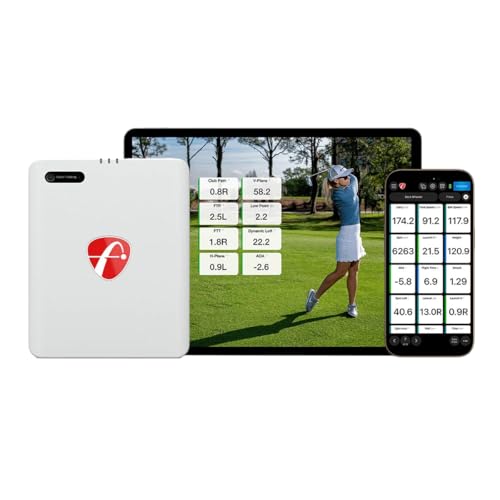
The FlightScope Mevo Gen2 Pro Package combines precise 3D Doppler radar tracking with an integrated camera and an 8-course E6 Connect bundle. This setup supports indoor or outdoor practice with GPS overview and Shot Tracer overlays. It is best for players who want a compact, portable system that records swing video while delivering comprehensive data across 18 swing, chipping, and putting metrics. The ability to practice up to six hours on a single charge makes it suitable for longer practice sessions on the range or at home.
Who it’s best for: dedicated golfers who want a portable, data-rich system with an immersive video experience for swing analysis and practice sessions. Why selected: it combines robust data with visual playback and widely recognized E6 courses for familiar practice environments.
Limitation: the value depends on effectively using the FS Golf App for Tracer overlays and course simulations, which may require a learning curve for new users.
FlightScope Mevo Gen2 Face Impact: Video-Driven Swing Review
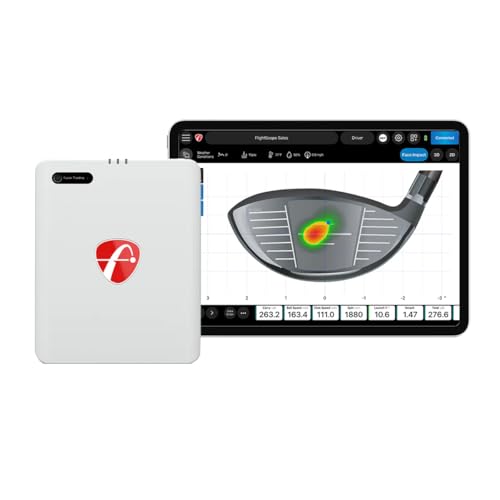
This variant emphasizes video with impact-focused software features. It mirrors the Mevo Gen2 capabilities and adds face impact integration to enhance alignment and ball-strike analysis. It’s well-suited for players who want a streamlined, portable video workflow with familiar FlightScope data overlays. The device works with the same ecosystem, supporting 18 data parameters and the same 6-hour battery life, ensuring consistent practice quality.
Who it’s best for: players who favor video-centric feedback tied to impact visuals, particularly those already invested in the FlightScope ecosystem. Why selected: it provides the same trusted data backbone with a video-first emphasis for quick adjustments.
Limitation: like the Pro package, success hinges on proper app setup and consistent data interpretation via the software suite.
Rapsodo MLM2PRO Launch Monitor: Pro-Level Data and Trials

The MLM2PRO provides tour-level shot-tracking accuracy through a Doppler radar and dual-camera configuration. It captures 15 key metrics, including spin rate, spin axis, carry distance, launch angle, and more. A 45-day premium trial unlocks simulated courses and third-party app integrations, broadening training scenarios. Best for players who want rigorous metric feedback with optional advanced training modules to supplement practice.
Who it’s best for: home and range golfers seeking precise data and the option to expand into simulations with a trial period. Why selected: its robust metric suite supports structured improvement and is backed by a reputable data-tracking approach.
Limitation: premium features are behind the trial, so users should plan to activate access to fully leverage the simulator and integrations.
Swinora Golf Launch Monitor: Zero Fees and 3D Range

Swinora emphasizes a no-subscription model with integrated environmental sensors that adjust data for real-time conditions—useful for both indoor and outdoor sessions. It expands on metrics by including attack angle, launch angle, spin rate, and essential vertical clubface data. The immersive 3D simulation features multiple viewing options to visualize trajectory, offering practical feedback for swing optimization.
Who it’s best for: users who want a cost-effective, subscription-free system with strong environmental awareness for authentic practice. Why selected: its zero-fee approach removes ongoing costs while delivering substantial 3D feedback and trajectory visualization.
Caution: space requirements are important for accurate radar capture; indoor setup needs careful planning to avoid data skew.
SnapSwing Hands-Free Golf Swing Recorder

SnapSwing records swings hands-free directly from the club grip, enabling immediate video capture without phone handling. This is ideal for solo practice at the range or home bays. The captured footage helps players visually compare posture, alignment, and tempo to improve mechanics independently of connected metrics.
Who it’s best for: solo golfers who want convenient, on-demand video capture without extra devices. Why selected: it provides an instant visual record that’s easy to review, promoting faster self-correction.
Limitation: video quality and lighting will affect review clarity; ensure proper lighting and camera alignment for best results.
Buying Guide: Key Considerations for Golf Swing Video Software
What should I look for in a swing video system?
Core data metrics, ease of use, and video integration matter most. Look for systems offering 18+ swing metrics with reliable video overlays, plus a straightforward app workflow for quick feedback after each session.
Do I need a subscription?
Some solutions include zero-fee setups or one-time purchases, while others rely on optional premium trials or memberships for full simulations. Determine whether you need ongoing access to simulated courses or advanced training modules before committing.
Is portability important?
Portability enables practice at the range or in a backyard. If you travel often or prefer flexible setups, choose a compact device with long battery life and easily swappable sensors.
How much space do I need?
Radar-based monitors require clear space for accurate data capture. Indoor use typically needs a minimum flight area, often around 15 feet or more, depending on the device. Always check the user guide for exact space recommendations.
What about video quality and playback?
Video overlays paired with precise metrics improve learning. Look for systems that render 3D flight paths, speed overlays, and shot-tracing directly on the recorded video for intuitive analysis.
Best practice setup tips
- Place the device per the manufacturer’s guidelines for optimal data capture.
- Pair with a stable mount or tripod to avoid jitter in video footage.
- Calibrate environmental sensors when available to reflect real-time conditions.
- Use sample practice drills to correlate data metrics and video cues.
FAQ
- What is the main difference between a video-focused system and a pure data monitor?
Answer: Video-focused systems emphasize visual feedback and overlays, while data-focused monitors prioritize numeric metrics like spin rate and launch angle. Some devices combine both for comprehensive analysis. - Can I use these systems indoors?
- How long does a typical practice session last with these devices?
- Do these devices require internet access for core features?
In summary, the top options balance video capture, data depth, and practical practice capabilities. For video-centric analysis with robust data, FlightScope Mevo Gen2 variants and Rapsodo MLM2PRO offer comprehensive packages. Swinora provides a subscription-free route with strong environmental adjustments, while SnapSwing delivers hands-free video capture for solo practice. Use the buying guide to determine which combination—video, metrics, or both—best aligns with your training goals and space constraints.