Answering the demand for accurate, on-the-go golf data, these portable launch monitors deliver club speed, ball speed, distance, and more without needing a full simulator setup. They suit different buyers: casual players seeking affordable data, indoor/outdoor practice enthusiasts, and performance-focused golfers who want robust metrics. The following picks are among the top portable options from 2021, balancing value, accuracy, and ease of use. The table below summarizes key picks to help compare at a glance.
| Product | Main Benefit | Best For | Approx. Battery/Power |
|---|---|---|---|
| PRGR HS 130-A | Affordable Doppler radar with memory for 500 swings | AAA batteries | |
| Voice Caddie SC300i | Real-time shot data with Doppler radar | Indoor/outdoor practice | Multiple battery modes |
| Swinora Golf Monitor | Zero annual fees, 3D range and trajectory | All-weather practice | Rechargeable |
| Shot Scope LM1 | Clubhead and ball speed with session history | Track progression over time | Battery or USB power |
| Garmin Approach R10 | Comprehensive metrics with virtual courses | All-around game training | Rechargeable |
PRGR HS 130-A Portable Golf Launch Monitor

The PRGR HS 130-A uses Doppler radar to deliver club head speed, ball speed, smash factor, total and carry distance. It operates without Wi-Fi or apps and runs on AAA batteries, making it highly portable and easy to set up in minutes. The device stores up to 500 swings in memory and offers data comparable to higher-end units at a fraction of the price. Best for players who want a simple, affordable way to quantify swings and track practice data without ongoing subscriptions.
Best for: Casual golfers and budget-conscious users who want reliable swing data on the range or backyard. Choose this if you prefer a straightforward device without connectivity requirements. Caution: no integration with mobile apps may limit advanced analysis for some players.
Voice Caddie SC300i Portable Golf Launch Monitor

The SC300i measures swing speed, ball speed, carry/total distance, smash factor, launch angle, apex, and spin (spin data available in the app). It uses Doppler radar to provide reliable data with claimed accuracy within ±3% for ball speed and ±3 yards for carry in target mode. It is suitable for home or outdoor use and supports extended battery life. Best for: Golfers who want detailed shot analytics and a robust mobile app experience. Limitations: some users may rely on app-based metrics that require setup and familiarity with the interface.
Swinora Golf Monitor & Simulator

Swinora’s system offers zero annual fees and environmental sensors that adjust data for real-time conditions. It provides expanded metrics like attack angle, launch angle, spin rate, and vertical clubface data, plus an immersive 3D driving range with alerts. Indoor use requires a clear space (about 15 feet total). Best for: Players who want a comprehensive, subscription-free package with real-time environmental adjustments. Caution: requires adequate room for accurate radar capture during indoor use.
Shot Scope LM1 Launch Monitor

The LM1 uses Doppler radar to provide clubhead speed, ball speed, and smash factor with session history stored locally, enabling zero-subscription practice data. It measures carry and total distance for each swing, helping players quantify yardages across clubs. Best for: Players who want a no-subscription data trail and easy transfer of sessions for progression tracking. Limitation: data depends on consistent radar readings and may require setup for optimal accuracy in tight spaces.
Garmin Approach R10 Portable Launch Monitor & Simulator Bundle
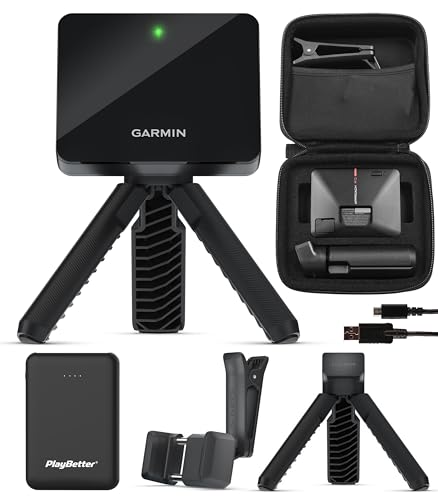
The Garmin Approach R10 bundle provides shot metrics, swing video capture, virtual rounds, and up to 10 hours of battery life. It integrates with the upgraded Home Tee Hero app offering a large library of courses and on-course practice modes. Best for: Golfers seeking an all-around training system with rich software features and a broad course library. Caution: battery life varies with features used; heavier practice sessions may require charging more frequently.
Buying Guide: Portable Launch Monitors For 2021 Buyers
- What metrics do you need? Identify must-have data such as club speed, ball speed, carry distance, smash factor, launch angle, and spin. Some models emphasize certain measurements more than others.
- Indoor vs outdoor use. If you train indoors with limited space, ensure the device can operate accurately in confined environments and includes a 3D range or simulation option if desired.
- Power and portability. Consider whether you prefer battery operation, rechargeable batteries, or USB power. Portability often correlates with battery life and weight.
- App and software features. Some monitors pair with mobile apps for deeper analytics, session histories, and virtual practice modes. Be prepared to install and navigate apps for full benefit.
- Ease of setup and use. Look for plug-and-play devices with minimal calibration requirements, especially if you swing quickly and want immediate feedback.
- Space requirements. Check the recommended practice area, especially for devices with radar, which may need a clear line of sight and sufficient room to capture ball flight.
Frequently Asked Questions
- Do portable launch monitors require subscriptions? Some models offer free features with no ongoing fees, while others include app-based or software subscriptions for advanced data.
- Can these devices be used both indoors and outdoors? Yes, most are designed for both environments, though space and lighting can affect accuracy and data capture.
- What is the typical data accuracy range? Data accuracy varies by model and mode, often advertised as within a few percent for ball speed and a handful of yards for carry under certain conditions.
- Which monitor is best for beginners? Budget-friendly units with straightforward interfaces and essential metrics are usually best for newcomers to practice data tracking.
- Are these devices compatible with training apps? Several models offer companion apps that provide deeper analysis, video capture, and virtual practice.
- What should I consider for setup space? Indoor use generally requires a clear area, and some models include 3D driving ranges or trajectory views to maximize space usage.