If you’re looking to elevate your game with precise swing analysis, these top-tier golf swing analyzers deliver real-time metrics, video support, and actionable feedback. They’re best for serious players, coaches, and golf enthusiasts who want data-driven improvements. The following picks stand out for accuracy, ease of use, and depth of measurements across indoor and outdoor practice sessions. The quick comparison below helps you choose the right tool based on how you train and where you practice.
| Product | Best For | Key Metric Focus | Platform | Notes |
|---|---|---|---|---|
| Blast Motion Golf Swing & Stroke Analyzer | All skill levels; on-the-go practice | Swing tempo, swing speed, real-time feedback | Mobile app | Air Swings mode supports training without a ball |
| Rapsodo MLM2PRO Launch Monitor | Home & driving range with video support | Ball speed, carry, club speed, launch angle, 3D data | Compatible apps | Pro-level data with Doppler radar + dual cameras |
| Voice Caddie SC4 PRO | Indoor/outdoor practice with built-in screen | Ball speed, spin, carry, apex, launch angle | Voice Caddie app | Includes 3D range and no monthly subscription |
| Swinora Golf Launch Monitor & Simulator | Budget-conscious players seeking full metrics | Launch angle, attack angle, spin rate, 3D trajectory | Built-in radar & app | Zero annual fees; true-to-life data with conditions sensors |
| TheStack Radar | Speed-focused wedge and swing practice | Swing speed, ball speed, estimated carry, smash factor | TheStack app | Includes a free trial for additional training modes |
Blast Motion Golf Swing & Stroke Analyzer GEN3

The Blast Motion sensor provides real-time feedback to a dedicated app, tracking basic swing metrics from tee to green. Best for players who want immediate, actionable insights during daily practice and short-game work. It works well for golfers who want quick feedback and who train in varied locations, including without a ball using Air Swings mode. The included membership helps new users start tracking data quickly.
Best for: Players seeking real-time swing feedback that can be used during practice across locations, including short-game focus. Limitation: For deeper swing analysis, users may want additional metrics not shown in every mode.
Rapsodo MLM2PRO Launch Monitor

The MLM2PRO delivers tour-level shot-tracking data using Doppler radar and dual cameras. It captures carry distance, ball speed, club speed, launch angle, and other key metrics. Best for players who want a comprehensive home or range setup with a robust data suite and visual shot feedback. The included premium trial enhances training with simulated courses and advanced features.
Best for: Serious players who want precise, multi-metric data and video playback. Caution: Setup and interpretation may require a learning curve for newcomers to launch monitor data.
Voice Caddie SC300i Portable Launch Monitor

The SC300i provides real-time shot data with Doppler radar across indoor or outdoor practice. It measures swing speed, ball speed, carry distance, launch angle, apex, and spin, with extended battery life for long sessions. Best for golfers who want reliable measurements from a portable device with a clear app interface. Spin data is accessible within the My Swing Caddie app for additional insight.
Best for: Portable, long practice sessions with broad metric coverage. Caution: Spin data availability may depend on app configuration and training mode.
Swinora Golf Launch Monitor & Simulator

Swinora combines radar-based metrics with 3D simulation and an immersive driving range. It reports attack angle, launch angle, spin rate, and essential vertical data for indoors and outdoors. Best for players who want a feature-rich system with no ongoing subscription and built-in environmental sensors that adjust data for real-world conditions. Indoor space requirements should be observed for accurate radar capture.
Best for: Players seeking a sensor-first system with robust environmental data. Caution: Indoor space requirements can limit placement in smaller rooms.
TheStack Radar
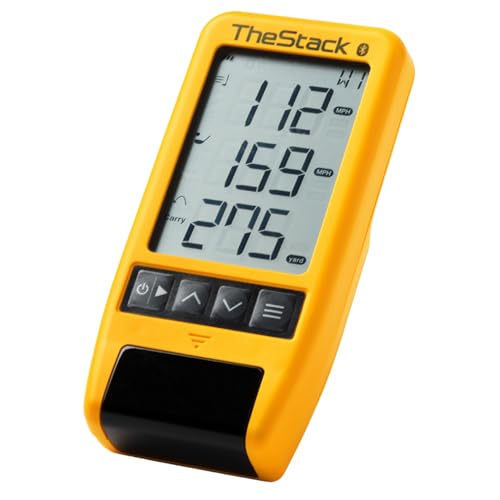
The Stack Radar measures swing speed and ball speed, delivering an estimated carry distance and smash factor. It’s designed for speed training and wedge practice, with data transmitted to the Stack app via Bluetooth. Best for players focusing on swing speed development and controlled practice with a gamified wedge routine. A one-month free trial to Stack Wedge Mode is included (iOS only).
Best for: Speed-focused training and wedge practice with a simple, app-driven interface. Limitation: Primarily centered on speed metrics and may rely on the Stack ecosystem for full use.
Buying Guide
- What metrics matter most? Decide whether you want fundamental swing speed and ball speed data, or deeper analytics like spin, apex, and path. Some devices emphasize video playback and shot-tracing, others focus on live radar metrics.
- Indoor vs. outdoor use: Some models include environmental sensors or compact designs for indoors. If you train outside often, ensure the device supports outdoor operation with reliable GPS or tracking in open space.
- Data depth and app ecosystem: Consider how deeply you want to analyze swings and whether you prefer a single app or an ecosystem with third-party integrations and simulators.
- Video capabilities: If video playback helps you understand swing faults, choose units with built-in video capture or easy video pairing.
- Portability and setup: For travel or limited space, prioritize lightweight sensors with straightforward setup and long battery life.
- Subscription models: Some devices require ongoing memberships to access advanced features. Decide if you’re willing to pay monthly for expanded data and simulations.
Frequently Asked Questions
- What is a golf swing analyzer used for?
It measures swing metrics (speed, path, angle) and ball flight data to help you improve mechanics and consistency. - Do these devices require a subscription?
Some do offer free access with basic features; others provide premium features via optional memberships. - Can I use these analyzers indoors?
Yes, many models are designed for indoor practice with radar, camera, or sensor-based tracking. - Is video playback included?
Several models offer video capture or playback to visualize your swing alongside numeric data. - Which is best for beginners?
Blast Motion and TheStack Radar are often easiest to start with, but the best choice depends on your preferred training style and budget.